


How to Remote Start a Honda
Learn the most common Honda remote-start sequence, how HondaLink remote start differs, which models and years this guide generally covers, and what to check when the engine does not start.
The Most Common Honda Remote-Start Method
Press the Lock button on the key fob, then press and hold the circular-arrow Remote Start button for at least one second. The exterior lights should flash and the engine should start on an equipped Honda.
This is the factory key-fob sequence used by many recent Honda vehicles, including equipped versions of the Honda CR-V, Pilot, Passport, Accord, Civic, Odyssey, Ridgeline, and HR-V. Feature availability still depends on the exact model year, trim, powertrain, key fob, and vehicle configuration.
This guide is written for Honda owners around Tracy, San Joaquin County, and nearby Valley-to-Bay communities including Brentwood, Discovery Bay, Ripon, and Patterson. Whether you are preparing for an early I-205 commute or cooling the cabin before a family trip, the first step is confirming that your Honda actually has factory remote engine start.
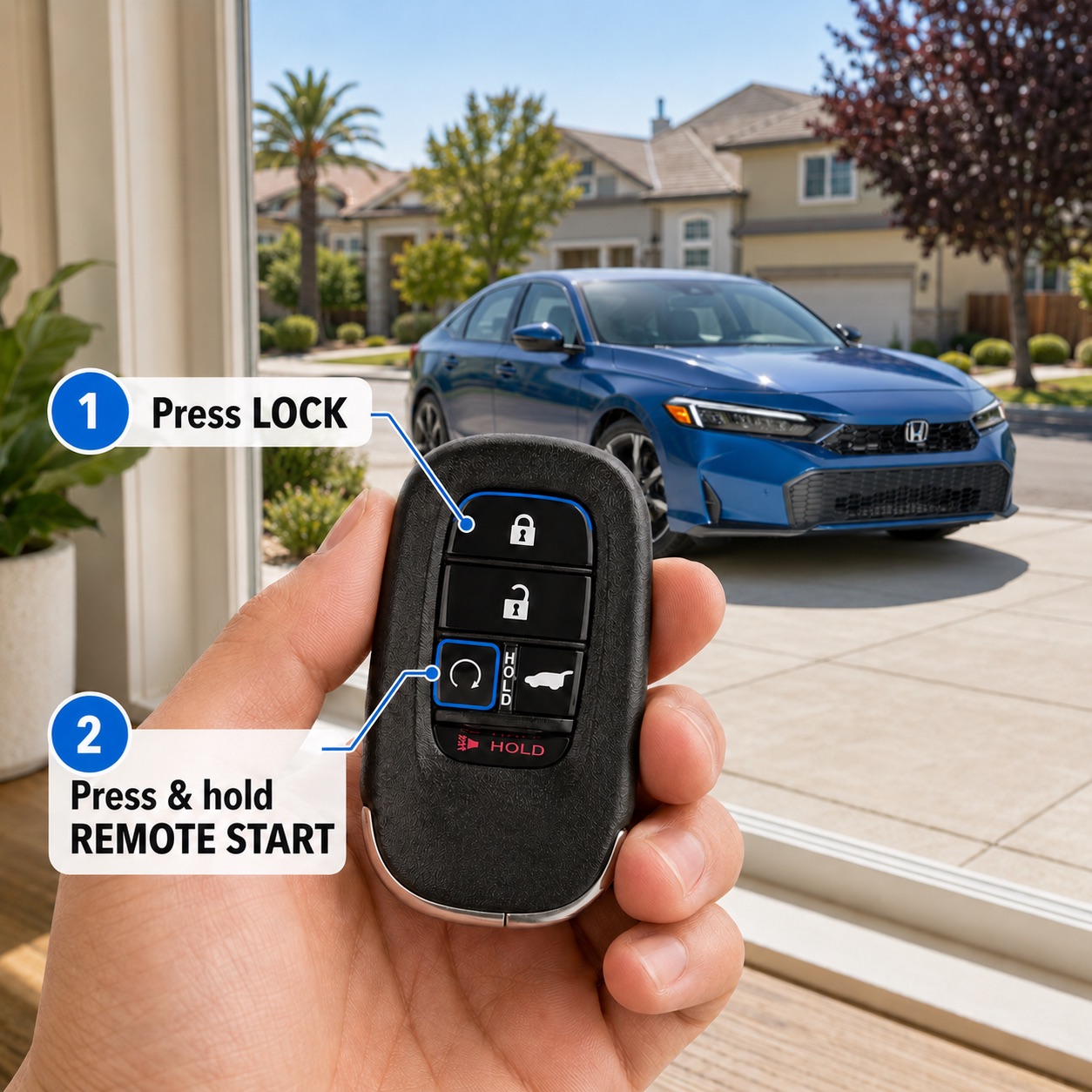
How to Remote Start a Honda with the Key Fob
Use these steps for a Honda equipped with a factory key fob that has a circular-arrow Remote Start button.
Step 1
Check the Vehicle and Your Range
Make sure the Honda is parked, the doors and openings are closed, and you are within the supported remote range. Current Honda CR-V and Pilot guidance describes a range of about 100 feet, although buildings, other vehicles, and radio interference can reduce it.
Step 2
Press the Lock Button
Press the Lock button on the Honda key fob. This establishes the first part of the remote-start command and confirms that the vehicle should remain secured while the engine runs.
Step 3
Hold the Remote Start Button
Immediately press and hold the circular-arrow Remote Start button for at least one second. Do not confuse it with the unlock, trunk, liftgate, or panic buttons.
Step 4
Watch for Confirmation
Look for the exterior lights to flash and listen for the engine to start. The automatic climate-control system should begin preparing the cabin according to the programming for that model and year.
Step 5
Enter and Prepare to Drive
Approach the Honda with the key fob, enter normally, press the brake pedal, and press the in-vehicle Engine Start/Stop button. The instrument panel should fully activate before you shift out of Park.
Watch: How to Use Honda Remote Engine Start
This video shows the common key-fob process and provides additional visual guidance. The exact key fob, vehicle, climate behavior, and confirmation signals can vary by model year.
Which Honda Models and Years Does This Work On?
This guide is most useful for many 2017 through 2026 U.S.-market Honda vehicles equipped with factory remote engine start. It does not mean that every Honda or every trim produced during those years has the feature.
The quickest equipment check is the key fob itself. A factory fob with the circular-arrow button is a strong indication that the vehicle supports the common Lock-then-Remote-Start sequence. For a definitive answer, check the owner’s manual or verify the vehicle’s equipment by VIN.
| Honda Remote-Start Model and Year Considerations | ||
|---|---|---|
| Vehicle or Year Group | Typical Method | Important Nuance |
| Honda CR-V and CR-V Hybrid | Lock, then hold Remote Start | Trim coverage changes by year. For example, Honda listed remote start on 2022 CR-V Special Edition and higher trims, while current equipment should be checked against the exact model year. |
| Honda Pilot | Lock, then hold Remote Start | Honda lists factory remote engine start as standard across the 2026 Pilot lineup. Older Pilot availability still varies by year and trim. |
| Honda Passport | Lock, then hold Remote Start | Recent Passport owner guidance uses the common Honda key-fob process. Climate and heated-feature behavior can depend on equipment and temperature. |
| Honda Accord and Civic | Common on equipped automatic-transmission models | Availability can vary substantially by trim, powertrain, body style, and year. Check for the circular-arrow key-fob button rather than assuming it is included. |
| Honda Odyssey and Ridgeline | Lock, then hold Remote Start on equipped vehicles | The common process applies to many recent versions, but trim and model-year verification remains important. |
| Honda HR-V | Lock, then hold Remote Start on equipped vehicles | Key-fob design and factory availability vary across HR-V generations and trims. |
| Older or Aftermarket Systems | System-specific | An accessory or aftermarket starter may use a different button sequence, separate remote, phone app, or security procedure. Follow the documentation supplied with that system. |
This table provides general orientation, not a complete trim-by-trim equipment list.
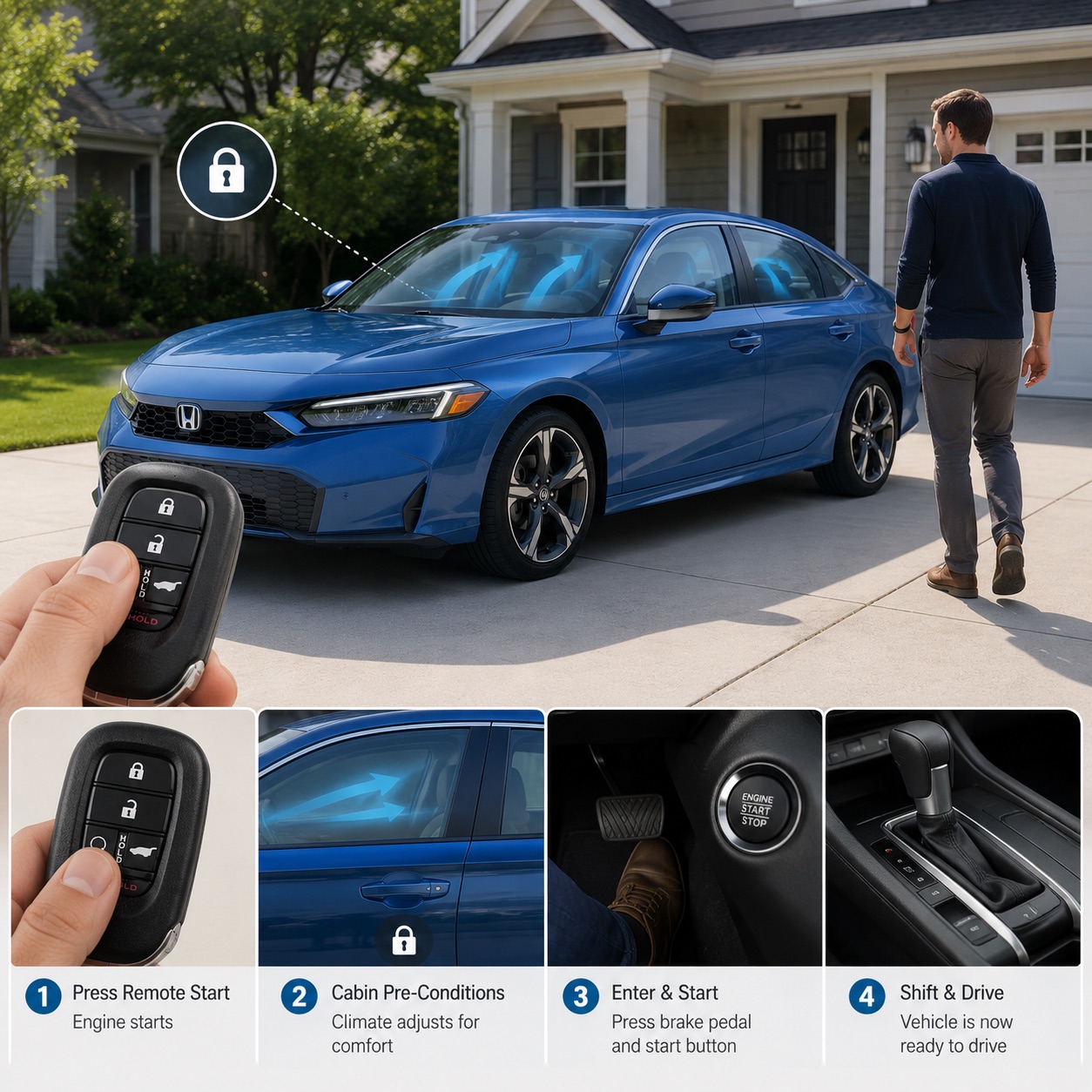
Before You Head Out
What Remote Start Does—and Does Not Do
Remote start gives the engine and automatic climate-control system time to begin preparing the cabin before you enter. That can be useful before a warm Central Valley afternoon or an early drive along the I-205 and I-580 corridor.
The doors remain locked, and the Honda is not ready to drive. Enter with the authorized key fob, press the brake pedal, and press the in-vehicle Engine Start/Stop button before shifting out of Park.
How to Remote Start a Honda with the HondaLink App
Some compatible Honda vehicles can receive a remote-start command through the HondaLink app. App-based remote start can work beyond normal key-fob range because the command uses the vehicle’s connected-services hardware rather than only the key fob’s short-range signal.
Downloading HondaLink does not automatically add remote start to every Honda. The vehicle must support the feature, be properly linked to the owner’s Honda account, and have any required connected-services enrollment or subscription.
Confirm HondaLink Compatibility First
A HondaLink account alone does not guarantee app-based remote start. The vehicle must include compatible connected-services hardware and may require enrollment in an eligible trial or paid service package.
What to look for: After selecting the vehicle in HondaLink, check for an available Remote or Start control. App screens, feature names, and verification prompts can change over time.
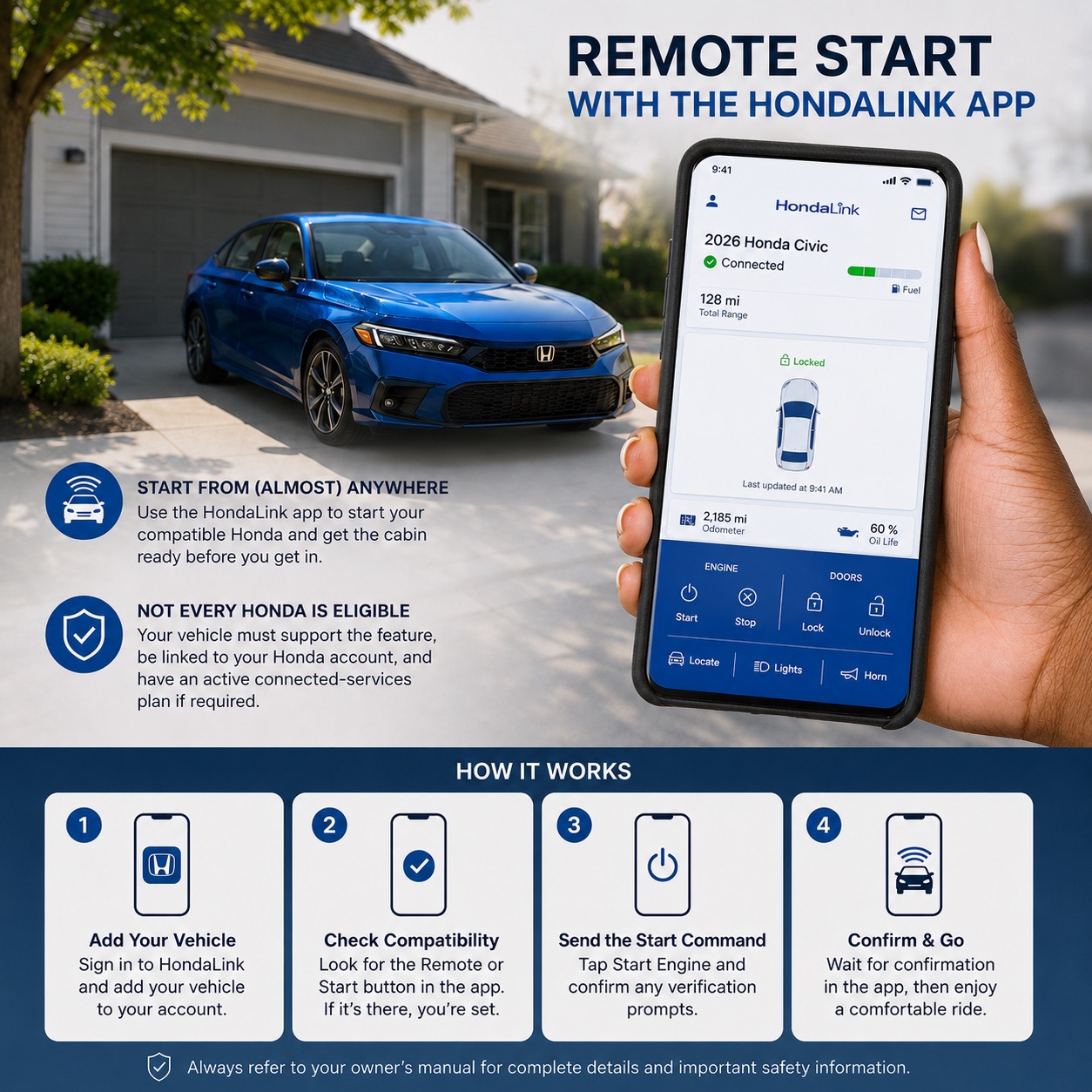
1. Add the Vehicle
Sign in with the Honda account connected to the vehicle and complete any requested ownership or enrollment steps.
2. Check Remote Compatibility
Open the vehicle dashboard in HondaLink and look for an available Remote or Start command. A missing control can indicate that the vehicle or service package does not support it.
3. Send the Start Command
Select Remote Start and follow the verification prompts shown in the app. A connected-services request can take longer than a key-fob command.
4. Confirm the App Response
Wait for HondaLink to confirm whether the command succeeded. Do not assume the vehicle started if the app displays a pending or failed request.
As one current example, Honda states that subscribers with a compatible 2026 CR-V Sport Touring Hybrid can use HondaLink remote start and select low, medium, or high climate settings. Availability and controls for other models or years can differ.
Why Is My Honda Remote Start Not Working?
What Does Honda Remote Start Do with the Climate System?
Factory remote start allows the automatic climate-control system to begin preparing the cabin before you enter. Honda’s current CR-V and Pilot guidance describes the system conditioning the interior toward 72 degrees Fahrenheit.
Some equipped models can also activate heated seats, a heated steering wheel, or defrosting functions under certain temperature conditions. Do not assume every Honda responds the same way. Climate programming depends on the model, year, trim, outside temperature, and installed equipment.
The benefit is easy to understand during real local use: cooling a Honda after it has been parked in Central Valley summer heat or preparing the cabin before an early drive along the I-205 and I-580 corridor. Remote start improves initial comfort, but it should not be used for prolonged unnecessary idling.
Remote-Start Safety Reminders
- Never remote start a Honda inside a closed garage or another enclosed space.
- Do not rely on remote climate control to leave a child or pet unattended in the vehicle.
- Keep the vehicle away from dry vegetation, combustible material, or anything that should not be near a running exhaust system.
- Follow local idling rules and avoid running the engine longer than needed.
- Remote start does not repair a weak battery, starting concern, warning light, or mechanical problem.
- Use the exact owner’s manual for vehicle-specific conditions, operating limits, cancellation steps, and run-time-extension instructions.
Get Honda Remote-Start Help at Tracy Honda
Tracy Honda can help determine whether a specific Honda or VIN includes factory remote start, identify the correct key fob, answer HondaLink compatibility questions, and inspect a vehicle that repeatedly rejects valid remote commands.
Our team supports Honda owners from Tracy, French Camp, Ripon, Brentwood, Discovery Bay, Patterson, Turlock, Merced, Oakdale, and surrounding San Joaquin County and Northern San Joaquin Valley communities.
Frequently Asked Questions
DISCLAIMERS:
*Remote engine start availability, operation, range, climate response, confirmation signals, run time, extension limits, and cancellation procedures vary by Honda model, model year, trim, powertrain, market, key fob, and vehicle configuration.
*This guide focuses on many recent U.S.-market Honda vehicles equipped with factory remote engine start. It does not confirm that every Honda produced from 2017 through 2026 includes the feature.
*HondaLink features, compatibility, trials, subscriptions, package names, app screens, network availability, and pricing may change. Verify current availability for the specific vehicle and account.
*Never operate a vehicle in an enclosed area. Follow applicable laws and the safety and operating instructions in the vehicle’s owner’s manual.
*Remote start is a convenience feature. It does not diagnose, correct, or repair battery, electrical, starting, security, warning-light, or mechanical concerns.
*For vehicle-specific instructions, refer to the exact owner’s manual or contact an authorized Honda dealer.